
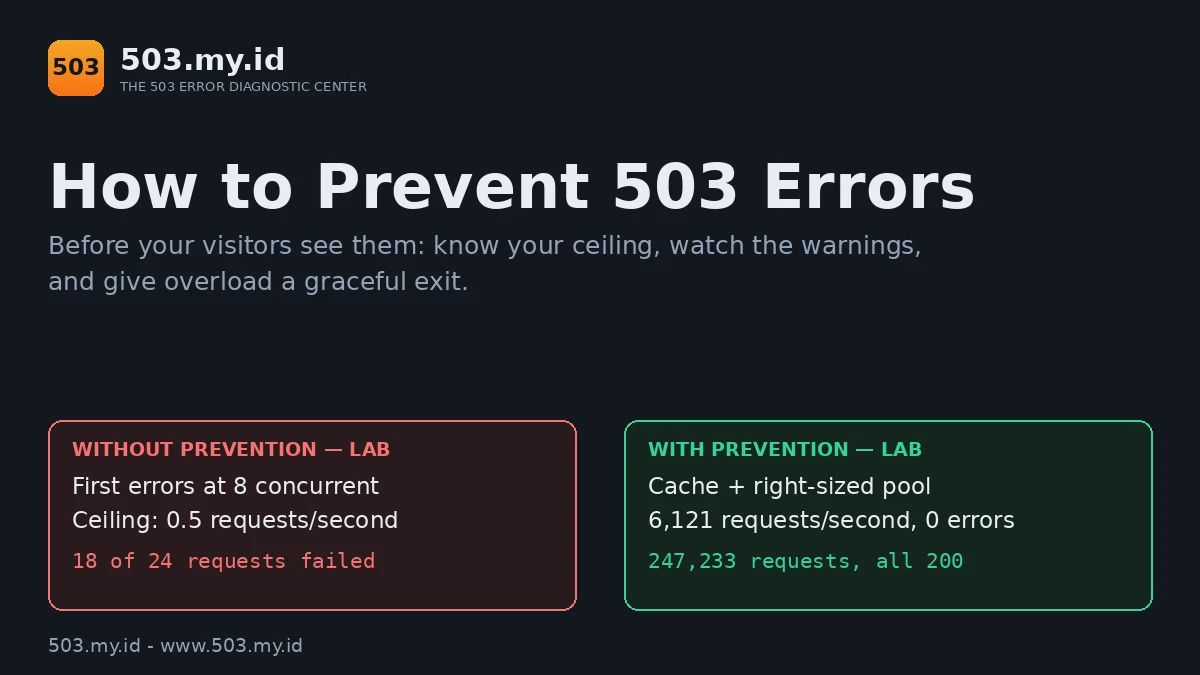
Same site, same traffic, twice: WordPress 7.1.4 on PHP-FPM 8.4 with nginx 1.26.3, load-tested in our lab on 16 November 2026 before the prevention steps — and again after them.
Prevention is three habits, not one tool.
- Know your ceiling: find the traffic level where your site first returns 503 (we show a safe way to test).
- Watch the early warnings: PHP workers, entry processes, and origin response time.
- Give overload a graceful exit: caching, a queue, and a proper 503 page with Retry-After instead of a crash.
Why Sites Return 503: The Overload Chain, Step by Step
A 503 is rarely an accident. It is the last link of a chain.
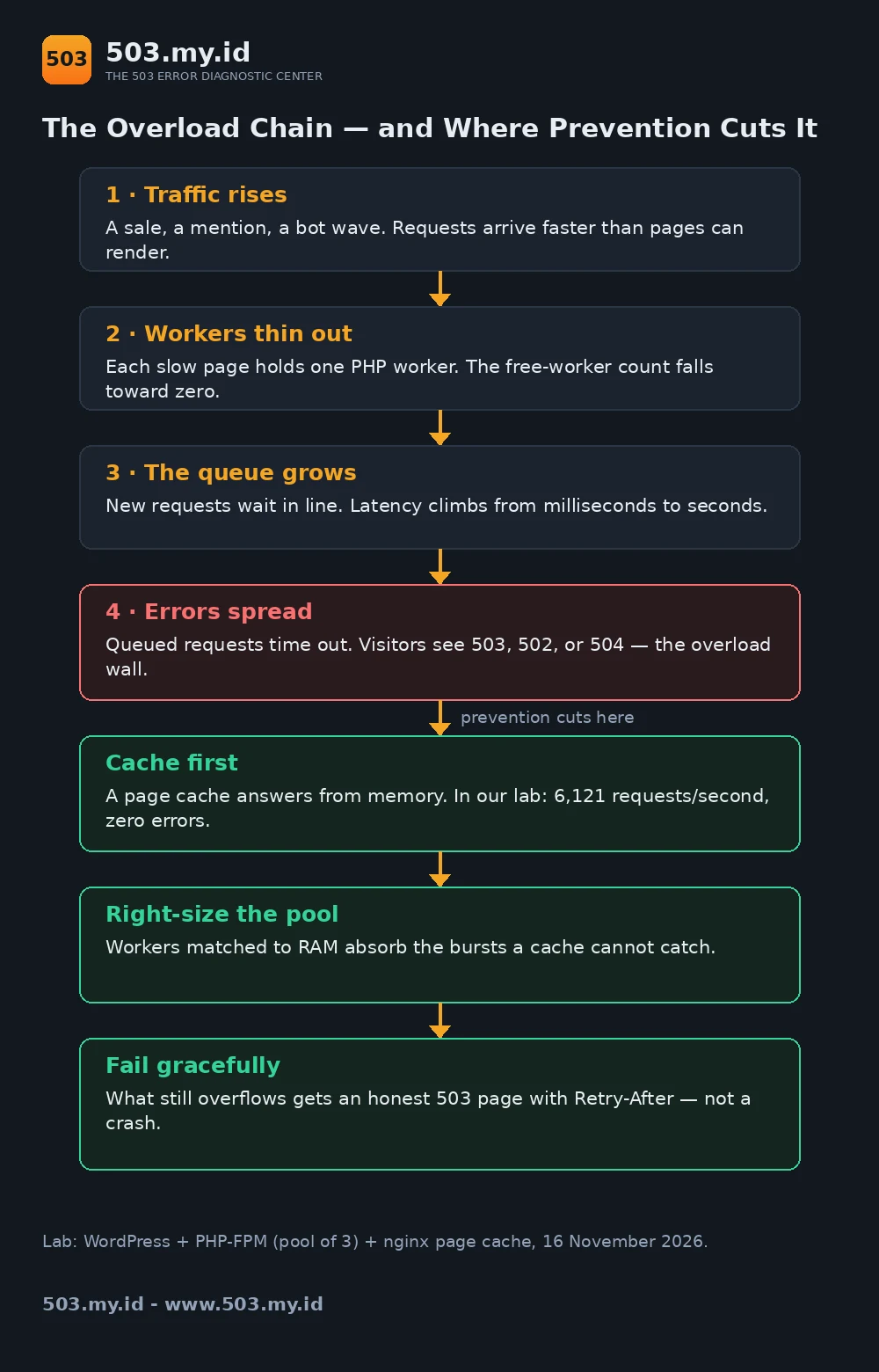
Our Fase 1 lab reproductions kept showing the same four links.
Link one: traffic rises. A sale, a mention, or a bot wave arrives.
Requests suddenly land faster than pages can render.
Link two: workers thin out. Every dynamic page holds one PHP worker.
Slow pages hold theirs longest, so free workers vanish first.
Link three: the queue grows. New requests wait behind busy workers.
Latency climbs from milliseconds to seconds, then tens of seconds.
Link four: errors spread. Queued requests pass a timeout somewhere.
Visitors then see 503, 502, or 504 — the overload wall.
The code varies by stack; the chain does not.
Prevention means cutting the chain before link four.
Each habit below cuts a different link.
Habit 1: Cache and Offload Before You Scale
A page cache answers from memory instead of PHP.
That single change removes most requests from the chain entirely.
In our lab, the same slow page went from six seconds to one millisecond.
The numbers are in the lab section below.
Cache in this order:
- Full pages for anonymous visitors — the highest-value cache there is.
- Static assets — images, CSS, and scripts with long lifetimes.
- Object cache — repeated database queries inside WordPress.
One warning, proven in our lab: never cache personalized pages.
Our test page prints a per-visitor token and a timestamp.
Under a full-page cache, the second visitor saw the first visitor’s token.
Same token, same timestamp — somebody else’s page.
On a real store, that page is a cart or account screen.
Exclude cart, checkout, and account paths from the cache, always.
Our lab verified the exclusion works: tokens differed again immediately.
Offload what you can, too: media, downloads, and search.
Every request answered elsewhere never reaches your workers.
Habit 2: Right-Size Your Workers and Limits
A cache cannot catch everything. Logged-in and dynamic requests remain.
Those land on PHP workers, so worker count is your second wall.
The sizing rule is arithmetic, from our PHP-FPM guide:
pm.max_children = RAM budget for PHP (MB) / memory per worker (MB)Our measured WordPress worker cost about 60 MB under load.
A 1,200 MB budget therefore means twenty workers — no guessing.
The full method lives in the PHP-FPM pool-full guide.
On shared hosting, the same wall wears different names.
Entry processes and I/O limits are your worker ceiling there.
The warning signs also rhyme: saturation at predictable, busy minutes.
Watch three early warnings, and the wall stops surprising you:
- The FPM log line
server reached pm.max_children. - Origin response time creeping up week over week.
- Slowlog entries naming the same script again and again.
Our health-check guide turns these into alerts.
Right-sizing is not “raise everything.” It is matching limits to memory.
The interlude in our lab test shows why, with real failure counts.
Habit 3: Plan Maintenance Like a Professional
Some downtime is chosen: updates, migrations, restarts.
Chosen downtime should never look like a crash.
Return a real 503 with a Retry-After header.
Search engines read that pair as “pause, come back later.”
A friendly page with status 200 tells them something false.
It says “this maintenance text is my real content.”
The complete, tested setup for Nginx, Apache, and WordPress is in the Retry-After maintenance guide.
Three habits separate professional maintenance from hopeful maintenance:
- Schedule off-peak, and announce the window beforehand.
- Verify the 503 and header with
curl -ibefore starting. - Verify again afterwards, and remove the switch completely.
During a sale, maintenance mistakes cost double.
Stores should rehearse the window before the campaign, not during it.
Our WooCommerce 503 guide covers sale-day specifics.
Habit 4: Fail Gracefully — Queues, Rate Limits, and a Human-Friendly 503 Page
No ceiling is infinite. Something will eventually exceed yours.
Design that moment instead of letting it happen to you.
Queue, do not drop. A short socket backlog absorbs bursts.
Our pool config queues sixty-four connections before refusing any.
Rate-limit the abusive. Bots do not deserve your scarcest resource.
Limit requests per IP at the web server, before PHP.
A limiter also converts a flood into a controlled trickle.
Answer honestly. The overflow that remains gets a real 503.
Serve it with a human page: what happened, when to retry.
Add Retry-After so polite clients — including Googlebot — wait efficiently.
A graceful 503 protects two things at once.
Visitors keep their trust, and crawlers keep your rankings.
The difference between an outage and an incident is preparation.
Our Lab Test: The Same Traffic, Before and After Prevention
One WordPress site, one deliberately slow page, two load rounds.
All numbers below are lab results, not promises.
The setup. WordPress 7.1.4 on nginx and PHP-FPM, Debian lab machine.
A lab plugin added a six-second delay to every front-end page.
That delay stands in for any heavy, uncached page.
Healthy, the homepage answered in 0.036 seconds.
The PHP-FPM pool started small on purpose: three workers.
Nginx read timeout was fifteen seconds, so queues became visible errors.
Round 1 — no prevention
- 2 concurrent: 8 requests, zero errors, median 6.1 seconds.
- 4 concurrent: 13 requests, zero errors; FPM logged
server reached pm.max_children (3). - 8 concurrent: 17 requests, 8 passed, 9 failed — first error at the fifteen-second timeout.
- 12 concurrent: 24 requests, 6 passed, 18 failed.
The ceiling was arithmetic: three workers, six seconds each.
Sustained throughput topped out near 0.5 requests per second.
On this stack the wall surfaced as 504 timeouts.
Apache and LiteSpeed hosts dress the same wall as 503.
The FPM log line — not the code — marked the real cause.
Interlude — raising limits only
We raised the pool to twenty workers, cache still off.
At forty concurrent, 46 of 90 requests passed; 44 still failed.
The wall moved roughly sevenfold — and it was still a wall.
Slow pages, not worker count, were the binding constraint.
Round 2 — cache plus right-sized pool
Then we enabled the nginx page cache, pool unchanged at twenty.
First request: cache miss, 6.08 seconds. Second: hit, 0.013 seconds.
- 12 concurrent: 124,812 requests, zero errors, median 1 millisecond.
- 40 concurrent: 122,421 requests, zero errors, median 6 milliseconds.
- Combined rate: about 6,100 requests per second, all 200.
- New
max_childrenlog lines during round 2: zero.
PHP was never touched; the cache answered everything.
We stopped at our generator’s ceiling, wall unfound.
The honest summary: prevention moved the ceiling beyond our test.
The one-page version ships with this article as a printable checklist.
Download it, print it, and run it before your next launch.
What Did Not Work
Raising limits alone. Twenty workers failed 44 of 90 requests.
More workers only postpone a slow page’s reckoning.
Caching everything. Our token page proved the danger directly.
Visitor two received visitor one’s token and timestamp.
On a store, that mistake leaks carts and account data.
Trusting the status code. Our wall answered 504, not 503.
Chasing the number would have hidden the full pool.
Restarting as a remedy. A restart clears queue and evidence together.
The same slow page refills the same pool within minutes.
FAQ
Can 503 errors be prevented completely?
No. Prevention makes them rare, brief, and polite.
Extreme overload should still end in an honest 503 with Retry-After.
What is the first prevention step for a small site?
Turn on a full-page cache for anonymous visitors.
It removes most requests from PHP in one move.
Does a CDN prevent 503 errors?
Partly. A CDN caches and absorbs traffic like our lab cache.
It cannot fix a slow origin for uncached, logged-in requests.
How often should I load-test?
Before every campaign, sale, or launch.
And after any plugin, theme, or hosting change.
Sources and date: Lab load tests run 16 November 2026 on WordPress 7.1.4, PHP-FPM 8.4.27, nginx 1.26.3 (Debian 13).
Pool sizing follows the PHP Manual and our lab-measured worker size. The 503 definition follows RFC 9110 §15.6.4.
Leave a Reply