Every step was tested as a visitor against our lab’s 503s, 18 November 2026. Including the steps that changed nothing. nginx 1.26.3 · PHP-FPM 8.4.27.
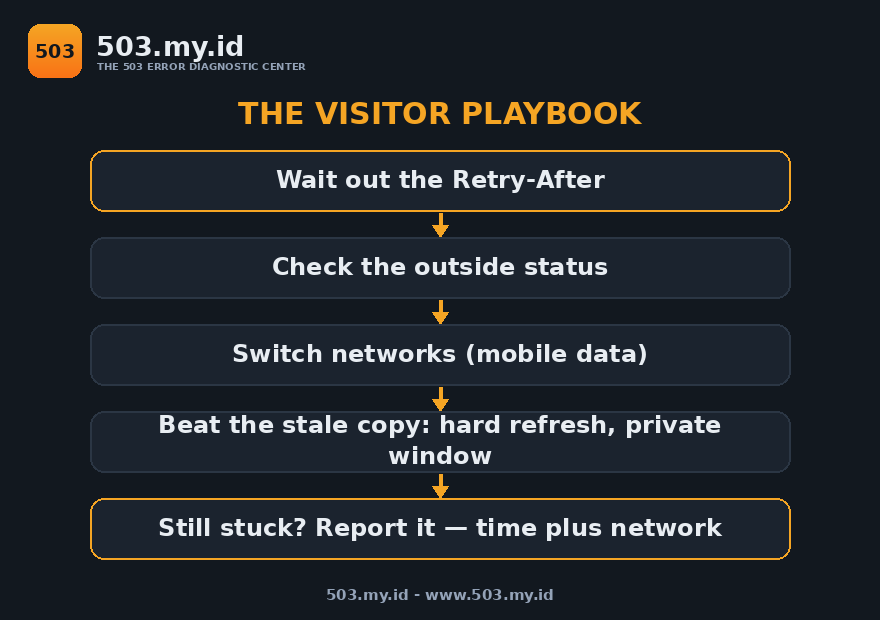
You cannot fix someone else’s server — but three moves genuinely help:
- Wait out the wait. If the page names a
Retry-After, honour it; our lab maintenance asked for 120 seconds and healed on schedule. - Change networks. A refusal aimed at your address disappears on mobile data — proven below, same page, same minute.
- Defeat the stale copy. If the site healed but you still fail, a cache on your path is serving the old 503.
Step 1: Wait — Properly, Once
A 503 is the one error that asks you to wait.
Well-behaved servers say for how long, in a header:
HTTP/1.1 503 Service Temporarily Unavailable
Retry-After: 120
Our lab’s maintenance page carried exactly that header.
Every retry during the window got the same 503.
The window ended on schedule; the next request answered 200.
WordPress maintenance asks for longer: Retry-After: 600.
Ten minutes feels endless and is still the honest number.
Refreshing early changed nothing in any of our runs.
It cannot — the switch does not care how often you knock.
Set a timer for the stated wait, plus a small margin.
One calm retry beats forty angry ones, measurably.
If no header is shown, give it a full minute first.
Then move to step 2 instead of refreshing again.
Step 2: Check Whether It Is Everyone
Before fighting your own setup, get a second opinion.
An outside checker fetches the site from its own network.
Its answer splits your problem cleanly in two.
Checker sees 503 too: the origin is failing for everyone.
Your remaining moves are waiting and, later, reporting.
Checker sees 200: the site is up and you are the exception.
Then steps 3 and 4 are where your fix lives.
Our 503 Checker does this fetch free, from the homepage.
Find it at 503.my.id — paste the address, read the status.
We used the same split to referee our own lab arguments.
Two networks beat ten opinions, every time we tested it.
The full reasoning sits in the whose-fault guide.
Step 3: Switch Networks
Servers refuse addresses, not people.
Rate limits, geo rules, and firewalls all key on your IP.
We reproduced a refusal aimed at exactly one address.
The blocked address received this, instantly:
503 — VISITOR-BLOCKED: this source address is refused by a server rule.A second address opened the same page at 200.
Same minute, same site — only the source differed.
Your version of that second address is your phone.
Turn off Wi-Fi and load the site on mobile data.
If it opens, your home or office address is the refused one.
A VPN achieves the same change of address.
It helps only in this case — remember that boundary.
When the origin is down for everyone, no network switch helps.
Our pool-saturation runs refused every source identically.
Step 4: Beat the Stale Copy
Sometimes the site healed and your copy did not.
A cache between you and the site can hold the old 503.
We cached a lab 503, then healed the origin.
The same visitor kept receiving the error afterwards:
Origin, asked directly:   200 OK
Same visitor, via cache:  503 — X-Cache: HIT
The entry expired on its own after sixty seconds.
Real caches hold entries far longer than our lab’s minute.
Three counters, in the order we would try them:
Hard refresh — your browser revalidates its stored copy.
A private window — it starts with an empty browser cache.
A query string — appending ?x=1 sometimes fetches fresh.
That third one worked in our lab, and we can say why.
Our cache key included the full address, query included.
Keys designed to ignore queries would have served the stale page.
So treat it as a coin flip, not a technique.
If all three fail, the cache is upstream — wait it out.
Step 5: Report It So It Gets Fixed
Owners cannot fix refusals they never see.
Whitelisted admin addresses often hide the failure from them.
We know — our lab owner browsed 200 through a visitor outage.
A useful report takes four lines:
Subject: 503 on [page address] — seen from [city/network]

- Page: [full address]
- When: [date, time, timezone]
- My network: [home Wi-Fi / mobile data / office]
- Outside checker said: [503 / 200] at the same minute
- What I see: [screenshot or the exact error text]
Send it through the site’s contact page or social account.
That bundle separates your case from a global outage instantly.
It is the difference between “works for me” and a fix.
What Feels Helpful and Is Not
Refresh storms. Forty retries during our maintenance window: forty 503s.
The switch flipped on its own schedule, not on request count.
Clearing cookies. Cookies were innocent in every reproduction.
Refusals keyed on addresses and caches, never on cookies.
Restarting your router. It changes nothing server-side.
Unless it earns you a new IP address, the refusal persists.
A VPN against a global outage. Elegant, useless.
When every source is refused, changing yours adds nothing.
Switching browsers first. Browsers were messengers in all our cases.
Test networks before software; the split is cleaner.
FAQ
How long should I wait before retrying a 503?
As long as the Retry-After header says, when one exists.
Our lab asked for 120 seconds; WordPress asks for 600.
Without a header, wait a minute, then check step 2.
The site works on my phone but not my laptop. Why?
Different networks, different addresses, different verdicts.
Your Wi-Fi address is refused or holds a stale copy.
Steps 3 and 4 are written for exactly this split.
Can I get around a 503 with a VPN?
Only when the refusal targets your address.
That is a real case — we reproduced it in the lab.
Against a genuine outage, a VPN changes nothing.
Is the 503 storing anything dangerous on my device?
No. It is a plain refusal response from the server.
Your browser may cache the error page itself, briefly.
Step 4 clears that copy if it lingers.
Should I tell the site owner, or just wait?
Wait first — most 503s heal in minutes.
Report it when the checker disagrees with what you see.
That mismatch is the case owners cannot detect alone.
Sources and date: visitor steps tested 18 November 2026 against lab 503s on nginx 1.26.3, PHP-FPM 8.4.27 (Debian 13); results quoted from those runs.
Header behaviour follows RFC 9110; WordPress maintenance timing follows WordPress core behaviour verified in the same lab.
Leave a Reply