HTTP Status Code Explorer: 500 vs 502 vs 503 vs 504 vs 429
Every panel below is a real capture, not a mock-up: on 16 November 2026 our lab forced all five codes on one Nginx 1.26.3 + PHP-FPM 8.4.27 stack and recorded what each one actually returned.
Not sure which error you have?
Read the exact code in your browser or checker result.
Click that code in the Explorer — cause, who is at fault, and first fix appear side by side.
Open the full fix guide linked inside your code’s panel.
Explore the 5 Server Error Codes
Click a code. Its cause, fault owner, real capture, and first fix appear.
Every capture below comes from our own lab reproduction, not documentation.
No code yet? Run the URL through our 503 Checker first.
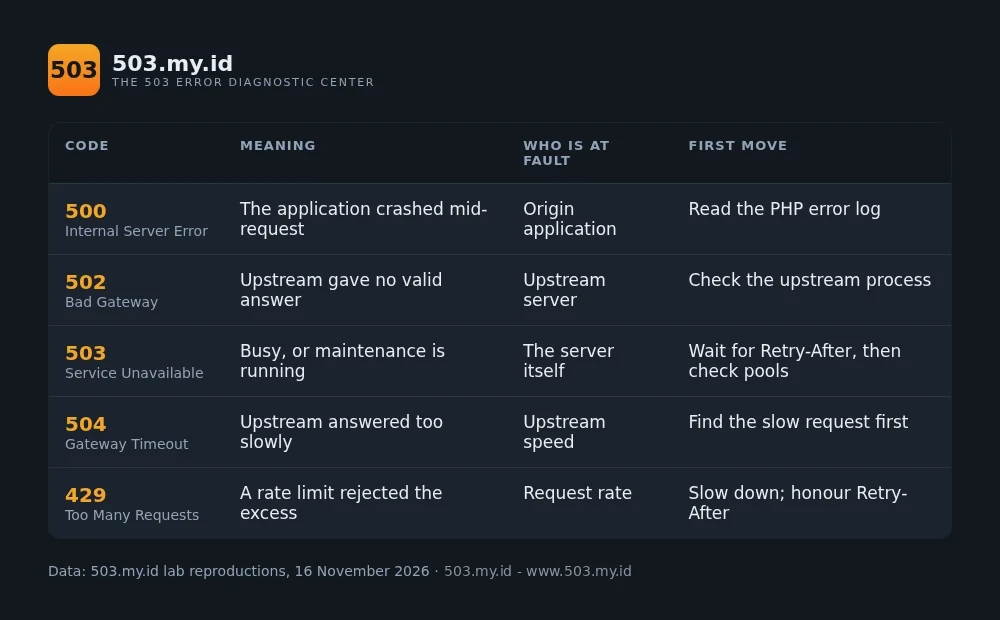
The same five codes, one line each. This table works without JavaScript.
Code
Meaning
Who is at fault
First move
500 Internal Server Error
The application crashed mid-request
Origin application
Read the PHP error log
502 Bad Gateway
Upstream gave no valid answer
Upstream server
Check the upstream process
503 Service Unavailable
Busy, or maintenance is running
The server itself
Wait for Retry-After, then check pools
504 Gateway Timeout
Upstream answered too slowly
Upstream speed
Find the slow request first
429 Too Many Requests
A rate limit rejected the excess
Request rate
Slow down; honour Retry-After
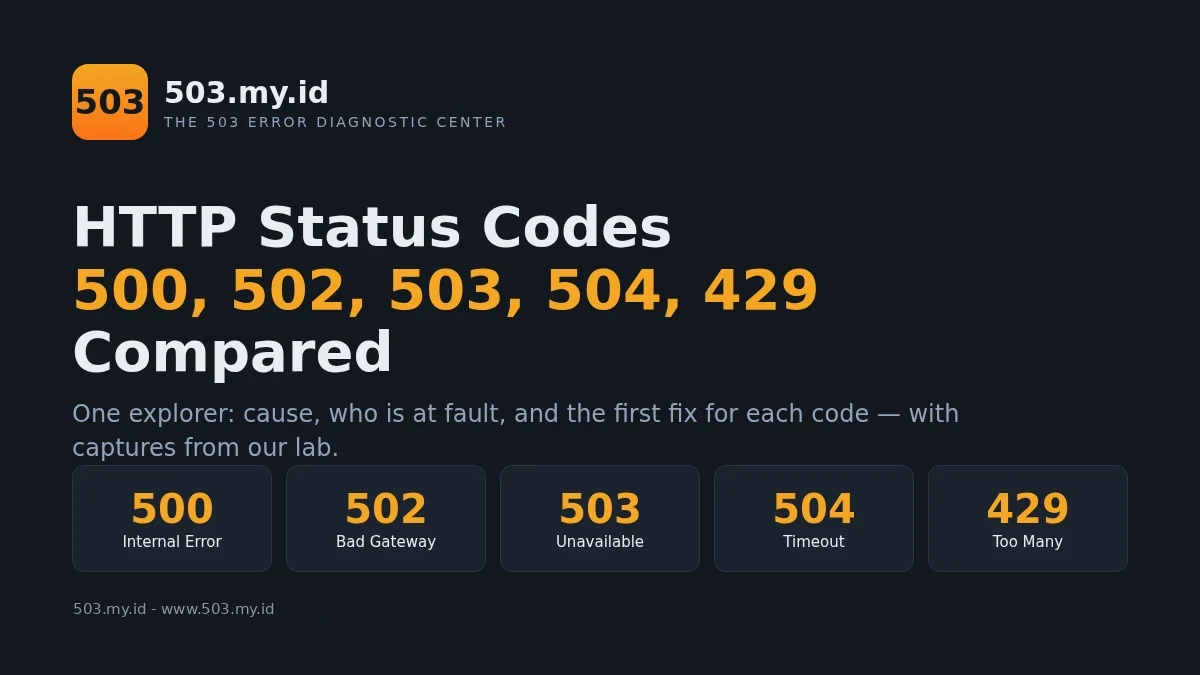
Image: the five server error codes compared. Source: 503.my.id lab reproductions, November 2026. Free to reuse with credit and a link to the source.Animation: the five codes as five doors — what sits behind the 502, 503, and 504 doors, animated from our lab captures. HTTP Status Codes 500, 502, 503, 504, 429 Compared by 503.my.id.
Embed this animation on your site
<iframe src="https://www.503.my.id/wp-content/uploads/2026/11/paket03-motion.html" width="100%" height="618" style="border:0;max-width:880px" loading="lazy" title="HTTP Status Codes 500, 502, 503, 504, 429 Compared"></iframe>
<p><a href="https://www.503.my.id/tools/http-status-code-explorer/">HTTP Status Codes 500, 502, 503, 504, 429 Compared</a> by <a href="https://www.503.my.id/">503.my.id</a>.</p>
Broken: 500 and 502. Something crashed (500), or the upstream behind the proxy died (502).
Gone quiet: 504. The upstream exists but does not answer before the timeout expires.
Throttled: 429. Nobody crashed. A counter simply said: too many, too fast.
Start with the word, not the number. Each word points at a different layer.
Our Nginx guide decodes the log lines behind 502 and 504.
Embed This Explorer on Your Site
Copy the block below into any page. One file, no dependencies, no tracking.
The credit line inside is required. The data and footer travel with it.
Embed this explorer on your site
<div id="sce503" style="font-family:system-ui,-apple-system,Segoe UI,Roboto,sans-serif;max-width:760px;margin:24px auto;border:1px solid #2B3644;border-radius:12px;padding:20px;background:#1B232E;color:#E8EDF2">
<style>
#sce503 .sce-codes{display:flex;flex-wrap:wrap;gap:8px;margin:0 0 16px}
#sce503 button.sce-code{font:inherit;font-weight:800;font-size:1.05rem;padding:10px 18px;border:1px solid #2B3644;border-radius:8px;background:#12181F;color:#E8EDF2;cursor:pointer}
#sce503 button.sce-code:hover{border-color:#F5A524}
#sce503 button.sce-code[aria-pressed="true"]{background:linear-gradient(180deg,#F5A524,#F97316);color:#12181F;border-color:#F97316}
#sce503 .sce-panel h3{margin:0 0 4px;font-size:1.25rem;color:#E8EDF2}
#sce503 .sce-panel h3 .sce-num{color:#F5A524}
#sce503 .sce-meaning{margin:0 0 12px;line-height:1.45}
#sce503 .sce-grid{display:grid;grid-template-columns:1fr 1fr;gap:10px;margin:0 0 12px}
@media (max-width:560px){#sce503 .sce-grid{grid-template-columns:1fr}}
#sce503 .sce-cell{border:1px solid #2B3644;border-radius:8px;padding:10px 12px;background:#12181F}
#sce503 .sce-cell h4{margin:0 0 4px;font-size:.78rem;letter-spacing:.06em;text-transform:uppercase;color:#94A3B8}
#sce503 .sce-cell p{margin:0;line-height:1.45}
#sce503 .sce-fault-err{display:inline-block;padding:2px 10px;border-radius:999px;background:#2A1B1E;color:#F87171;font-weight:700}
#sce503 .sce-fault-wait{display:inline-block;padding:2px 10px;border-radius:999px;background:#2B2113;color:#F5A524;font-weight:700}
#sce503 .sce-look{background:#0A0E13;border:1px solid #2B3644;border-radius:8px;padding:12px;margin:0 0 12px;overflow-x:auto}
#sce503 .sce-look h4{margin:0 0 6px;font-size:.78rem;letter-spacing:.06em;text-transform:uppercase;color:#94A3B8}
#sce503 .sce-look pre{margin:0;font-size:.82rem;line-height:1.5;color:#E8EDF2;white-space:pre-wrap;word-break:break-word}
#sce503 .sce-fix{display:inline-block;background:linear-gradient(180deg,#F5A524,#F97316);color:#12181F;padding:9px 16px;border-radius:8px;text-decoration:none;font-weight:700}
#sce503 .sce-all{margin:0 0 14px;background:none;border:none;color:#F5A524;cursor:pointer;font:inherit;text-decoration:underline;padding:0}
#sce503 .sce-compare{display:grid;grid-template-columns:repeat(auto-fit,minmax(200px,1fr));gap:10px;margin:0 0 6px}
#sce503 .sce-mini{border:1px solid #2B3644;border-radius:8px;padding:12px;background:#12181F}
#sce503 .sce-mini h4{margin:0 0 6px;font-size:1.05rem;color:#F5A524}
#sce503 .sce-mini p{margin:0 0 8px;line-height:1.4;font-size:.92rem}
#sce503 .sce-mini p b{color:#94A3B8;font-weight:600}
#sce503 .sce-credit{margin:16px 0 0;font-size:.8rem;color:#94A3B8}
#sce503 .sce-credit a{color:#F5A524}
</style>
<div class="sce-codes" role="group" aria-label="Choose a status code">
<button type="button" class="sce-code" data-code="500" aria-pressed="false">500</button>
<button type="button" class="sce-code" data-code="502" aria-pressed="false">502</button>
<button type="button" class="sce-code" data-code="503" aria-pressed="true">503</button>
<button type="button" class="sce-code" data-code="504" aria-pressed="false">504</button>
<button type="button" class="sce-code" data-code="429" aria-pressed="false">429</button>
</div>
<div class="sce-panel" id="sce503-panel">
<h3><span class="sce-num" id="sce503-num"></span> <span id="sce503-name"></span></h3>
<p class="sce-meaning" id="sce503-meaning"></p>
<div class="sce-grid">
<div class="sce-cell"><h4>Who is at fault</h4><p><span id="sce503-fault"></span></p></div>
<div class="sce-cell"><h4>Typical cause</h4><p id="sce503-cause"></p></div>
</div>
<div class="sce-look"><h4>What it looks like — captured in our lab</h4><pre id="sce503-look"></pre></div>
<p style="margin:0 0 12px;line-height:1.45"><b>First fix:</b> <span id="sce503-first"></span></p>
<a class="sce-fix" id="sce503-link" href="#">Open the fix guide</a>
</div>
<p style="margin:14px 0 0"><button type="button" class="sce-all" id="sce503-all">Compare all five side by side</button></p>
<div class="sce-compare" id="sce503-compare" hidden></div>
<p class="sce-credit"><a href="https://www.503.my.id/tools/http-status-code-explorer/">HTTP Status Codes 500, 502, 503, 504, 429 Compared</a> by <a href="https://www.503.my.id/">503.my.id</a>.</p>
<script>
(function(){
var D={
"500":{name:"Internal Server Error",ref:"RFC 9110 \u00a715.6.1",meaning:"The server hit an error it does not know how to handle.",fault:"Origin application",fw:"err",cause:"A PHP fatal error, a crashed script, or a broken plugin stops the page mid-run.",look:"HTTP/1.1 500 Internal Server Error\nPHP Fatal error:  Uncaught Error: Call to undefined function lab_missing_function() in /srv/lab/www/fatal.php:2",first:"Open the PHP error log and read the first fatal line \u2014 it names the file and the line.",u:"/503-service-unavailable/",l:"Start with the pillar guide"},
"502":{name:"Bad Gateway",ref:"RFC 9110 \u00a715.6.2",meaning:"The gateway asked the upstream and got an invalid answer \u2014 or none at all.",fault:"The upstream server",fw:"err",cause:"PHP-FPM or the app server is stopped, crashed, or restarting while traffic still arrives.",look:"HTTP/1.1 502 Bad Gateway\nconnect() failed (111: Connection refused) while connecting to upstream",first:"Check the upstream process is alive, then read the proxy error log for the refused connection.",u:"/fix-503-error-nginx/",l:"Fix it: the Nginx guide"},
"503":{name:"Service Unavailable",ref:"RFC 9110 \u00a715.6.4",meaning:"The server is alive but temporarily cannot take the request. It may send Retry-After.",fault:"The server \u2014 busy or in maintenance",fw:"wait",cause:"Maintenance mode, a saturated worker pool, or a deliberate rule answers until capacity returns.",look:"HTTP/1.1 503 Service Temporarily Unavailable\nRetry-After: 600\n\"GET /maint HTTP/1.1\" 503",first:"Wait the Retry-After interval, then check maintenance files and worker pools before changing anything.",u:"/503-service-unavailable/",l:"Fix it: the 503 pillar guide"},
"504":{name:"Gateway Timeout",ref:"RFC 9110 \u00a715.6.3",meaning:"The gateway waited for the upstream, and the upstream did not answer in time.",fault:"The upstream \u2014 too slow",fw:"wait",cause:"A slow script, a locked database, or an overloaded backend misses the proxy timeout.",look:"HTTP/1.1 504 Gateway Time-out\nupstream timed out (110: Connection timed out) while reading response header from upstream",first:"Find the slow request in the log first. Raising timeouts before that only hides it.",u:"/fix-503-error-nginx/",l:"Fix it: the Nginx guide"},
"429":{name:"Too Many Requests",ref:"RFC 9110 \u00a715.5.19",meaning:"Too many requests inside one window. The server refuses until the window resets.",fault:"The request rate \u2014 or the limit setting",fw:"wait",cause:"A rate limit \u2014 Nginx limit_req, a CDN rule, an API quota \u2014 counts requests and rejects the excess.",look:"HTTP/1.1 429 Too Many Requests\nlimiting requests, excess: 0.990 by zone \"lab429\", client: 127.0.0.1",first:"Slow down and honour Retry-After. If these are real visitors, raise the limit deliberately.",u:"/fix-503-error-nginx/",l:"Fix it: rate limits in the Nginx guide"}
};
var num=document.getElementById('sce503-num'),name=document.getElementById('sce503-name'),meaning=document.getElementById('sce503-meaning'),fault=document.getElementById('sce503-fault'),cause=document.getElementById('sce503-cause'),look=document.getElementById('sce503-look'),first=document.getElementById('sce503-first'),link=document.getElementById('sce503-link');
var btns=document.querySelectorAll('#sce503 .sce-code');
function show(code){
var d=D[code];if(!d)return;
num.textContent=code;name.textContent=d.name+' ('+d.ref+')';meaning.textContent=d.meaning;
fault.textContent=d.fault;fault.className=(d.fw==='err')?'sce-fault-err':'sce-fault-wait';
cause.textContent=d.cause;look.textContent=d.look;first.textContent=d.first;
link.href=d.u;link.textContent=d.l;
btns.forEach(function(b){b.setAttribute('aria-pressed',b.getAttribute('data-code')===code?'true':'false');});
}
btns.forEach(function(b){b.addEventListener('click',function(){show(b.getAttribute('data-code'));});});
var allBtn=document.getElementById('sce503-all'),cmp=document.getElementById('sce503-compare');
allBtn.addEventListener('click',function(){
if(!cmp.hidden){cmp.hidden=true;allBtn.textContent='Compare all five side by side';return;}
if(!cmp.innerHTML){
['500','502','503','504','429'].forEach(function(c){
var d=D[c];var div=document.createElement('div');div.className='sce-mini';
div.innerHTML='<h4>'+c+' '+d.name+'</h4><p><b>Fault:</b> '+d.fault+'</p><p><b>Cause:</b> '+d.cause+'</p><p><b>First fix:</b> '+d.first+'</p>';
cmp.appendChild(div);
});
}
cmp.hidden=false;allBtn.textContent='Hide the comparison';
});
show('503');
})();
</script>
</div>
License: free to reuse with credit and a link to this page.
Footer inside the asset: 503.my.id — The 503 Error Diagnostic Center.
How We Keep This Data Accurate
Each panel’s example was captured from a live reproduction in our lab.
On 16 November 2026, one Nginx and PHP-FPM stack produced all five codes.
We forced a PHP fatal, killed an upstream, and set a maintenance return.
We starved an upstream of time until the proxy timed out.
We fired rapid requests until the rate limiter answered 429.
The exact status line and log line from each run sit inside its panel.
Definitions follow RFC 9110 for 500, 502, 503, 504, and 429.
When a reproduction changes, the capture and this date change with it.
What Did Not Work
Our first 503 capture had no Retry-After header at all.
add_header ignores error responses unless you add the word always.
Our first rate-limit test passed all five rapid requests.
A return 200 in the same location runs before limit_req ever counts.
When the limiter finally fired, it answered 503, not 429.
Nginx rejects with 503 until you set limit_req_status 429.
Writing burst=0 explicitly stopped Nginx from loading entirely.
The default is already zero. We deleted the parameter and retested.
FAQ
What is the difference between 502 and 503?
A 502 means the upstream answered badly or not at all — it is down.
A 503 means the server answered deliberately: busy, or under maintenance.
Which status code should a maintenance page return?
503, with a Retry-After header naming when you expect to return.
Search engines treat that pair as a pause, not a disappearance.
Is 429 a server error?
No. 429 sits in the 4xx client-error family, defined by RFC 6585.
It means the client asked too often — the server itself is healthy.
Can a site return 503 on one page and 200 on another?
Yes. Limits, rules, and pools apply per location, per pool, per route.
One saturated application can 503 while static pages answer 200 beside it.
Sources and date: all five captures reproduced in the 503.my.id lab on 16 November 2026.
Stack: Nginx 1.26.3 + PHP-FPM 8.4.27. Definitions checked against RFC 9110 the same day.