18 November 2026: two PHP backends behind nginx 1.26.3, updated one at a time. One client fired 128 requests mid-work; all 128 returned 200.
Never maintain the only copy of anything. Update one backend, prove it, then the next.
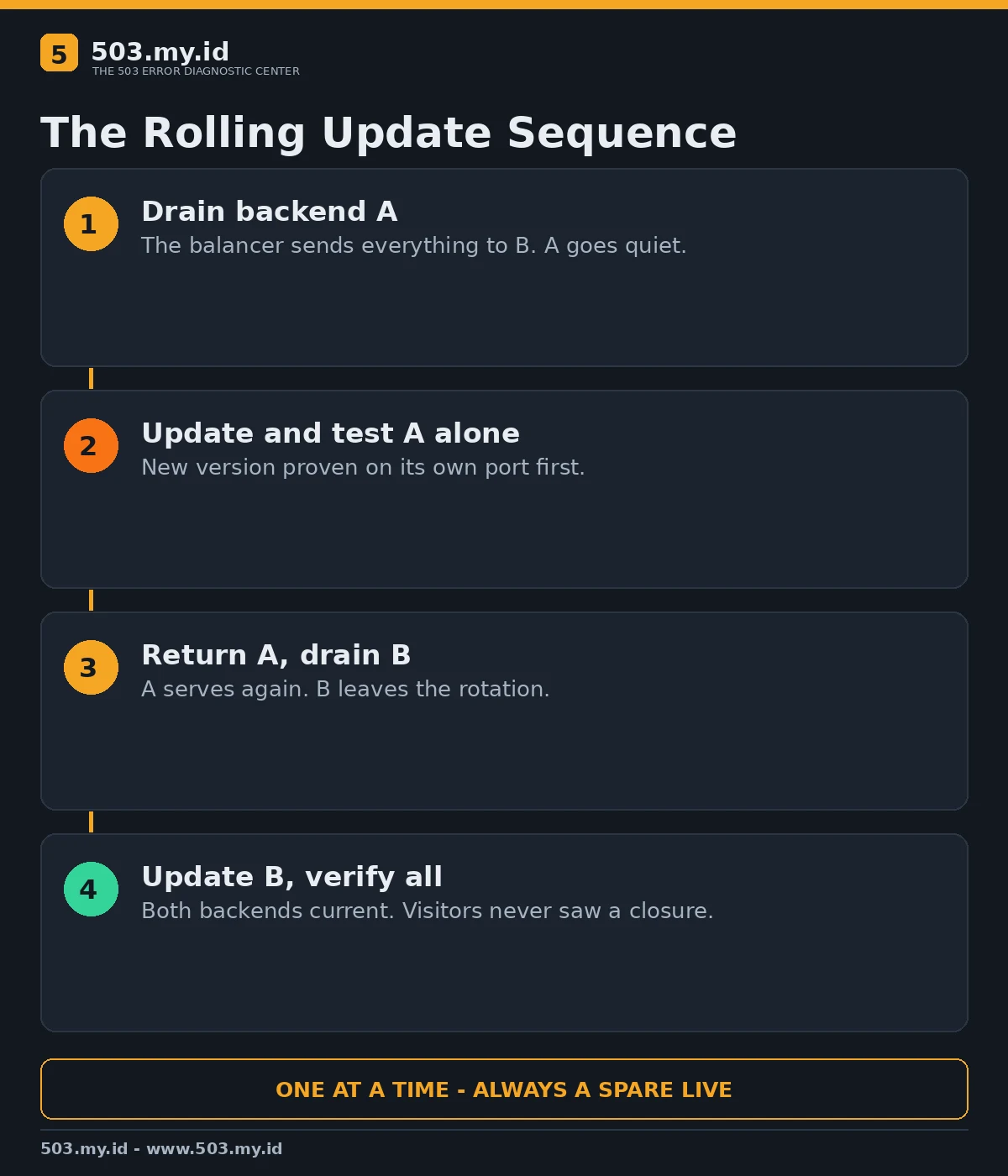
- Drain one backend out of the load balancer rotation.
- Update and test it alone, then return it to service.
- Repeat for the next backend; visitors never meet a closed site.
Planning a full stop instead? Read the SEO rules in does a 503 hurt SEO first.
“Site under maintenance” pages exist because somebody updated the only copy.
With two serving copies, maintenance becomes a rotation instead of an outage.
The technique is old, boring, and exactly why big sites patch at noon safely.
The One Idea: Keep a Spare in Service
A load balancer sends each request to one healthy backend.
Remove backend A from rotation and every request quietly lands on backend B.
Update A at leisure, test it directly, then let it serve again.
Repeat with B. At every moment, at least one current backend is live.
The sequence diagram below is the exact rotation our lab executed:
Our Lab: 128 Requests, Zero Failures
nginx 1.26.3 balanced two PHP backends, each stamping responses with its name and version.
The upstream block under test:
upstream batchb_roll {
    server 127.0.0.1:19001;
    server 127.0.0.1:19002;
}
A client requested the page continuously while we worked through the rotation.
Backend A was drained, updated from v1 to v2, tested directly, and returned.
Backend B then received the same treatment.
The client log for the whole operation:
requests: 128, status counts: {200: 128}
versions seen: backend-a-v1, backend-a-v2, backend-b-v1, backend-b-v2
Seeing both versions of both backends proves traffic genuinely followed the rotation.
No request met a maintenance page, because none was ever needed.
The Rolling Sequence, Step by Step
- Drain. Comment out or weight-down backend A; wait for its active requests to finish.
- Verify the drain. Your probe should now see only B’s version stamp.
- Update A. Deploy code, run migrations that stay backward-compatible, restart A’s services.
- Test A directly. Request A on its own port; check version, logs, and one real transaction.
- Return A. Restore its weight; watch error rates for several minutes.
- Repeat for B. Same order, same checks, no shortcuts because A went well.
Database changes are the sharp edge: both versions must tolerate the schema mid-roll.
Expand first, migrate data second, contract last — after every backend runs the new code.
One Server Only? Your Honest Options
A single small site cannot rotate what it does not have.
Staging on the same host still helps: swap document roots, and downtime shrinks to seconds.
A maintenance window at your quietest hour remains a legitimate, honest choice.
If the whole site must stop, answer 503 with a truthful Retry-After header.
Google’s own guidance treats that combination as a temporary, understood pause.
The timings that stay safe are mapped in how long a site can be down.
For WordPress specifically, our post-update 503 guide covers the repair side.
What Did Not Work
Updating both backends at once recreated the outage this method exists to prevent.
Skipping the direct test on A would have shipped an untested version to half the traffic.
A schema change that old code could not read broke B mid-roll in a side test.
That failure is why the expand–migrate–contract order is not optional decoration.
Announcing a maintenance page “just in case” trained nobody; the rotation simply worked.
Pre-Flight Checklist
- Two or more backends, each independently able to carry full traffic.
- Version stamps or logs that prove which backend answered.
- Migrations reviewed for old-code and new-code compatibility.
- A rollback copy of the previous release on every backend.
- Monitoring watched by a human until the last backend returns.
Fold the habit into how to prevent 503 errors permanently.
And keep our free 503 checker open during the roll.
FAQ
Do I need two physical servers?
No. Two independent application instances behind one balancer already enable the rotation.
What if a request is mid-flight during a drain?
Draining waits for active requests; only new requests move to the other backend.
Can I do this on shared hosting?
Not truly — you have one copy. Use staging swaps and short, honest maintenance windows instead.
Does Google penalise rolling updates?
Visitors and crawlers only ever see 200s, so there is nothing to penalise.
Sources and date: NGINX upstream documentation, Google Search Central guidance, and our lab test, checked 18 November 2026.
References
- Google Search Central — How to pause your online business on Google Search
- Google Search Central Blog — How to deal with planned site downtime
- NGINX Documentation — Module ngx_http_proxy_module (upstream servers)
- RFC 9110 §14.3 — Retry-After
Leave a Reply