Every cause below was switched on in our lab first: nginx 1.26.3 with PHP-FPM 8.4.27 on Debian 13 produced each 503 on 16 November 2026, and each fix was retested until the same requests passed.
Nginx itself rarely invents a 503 — it passes one from upstream or returns it from a limit or rule.
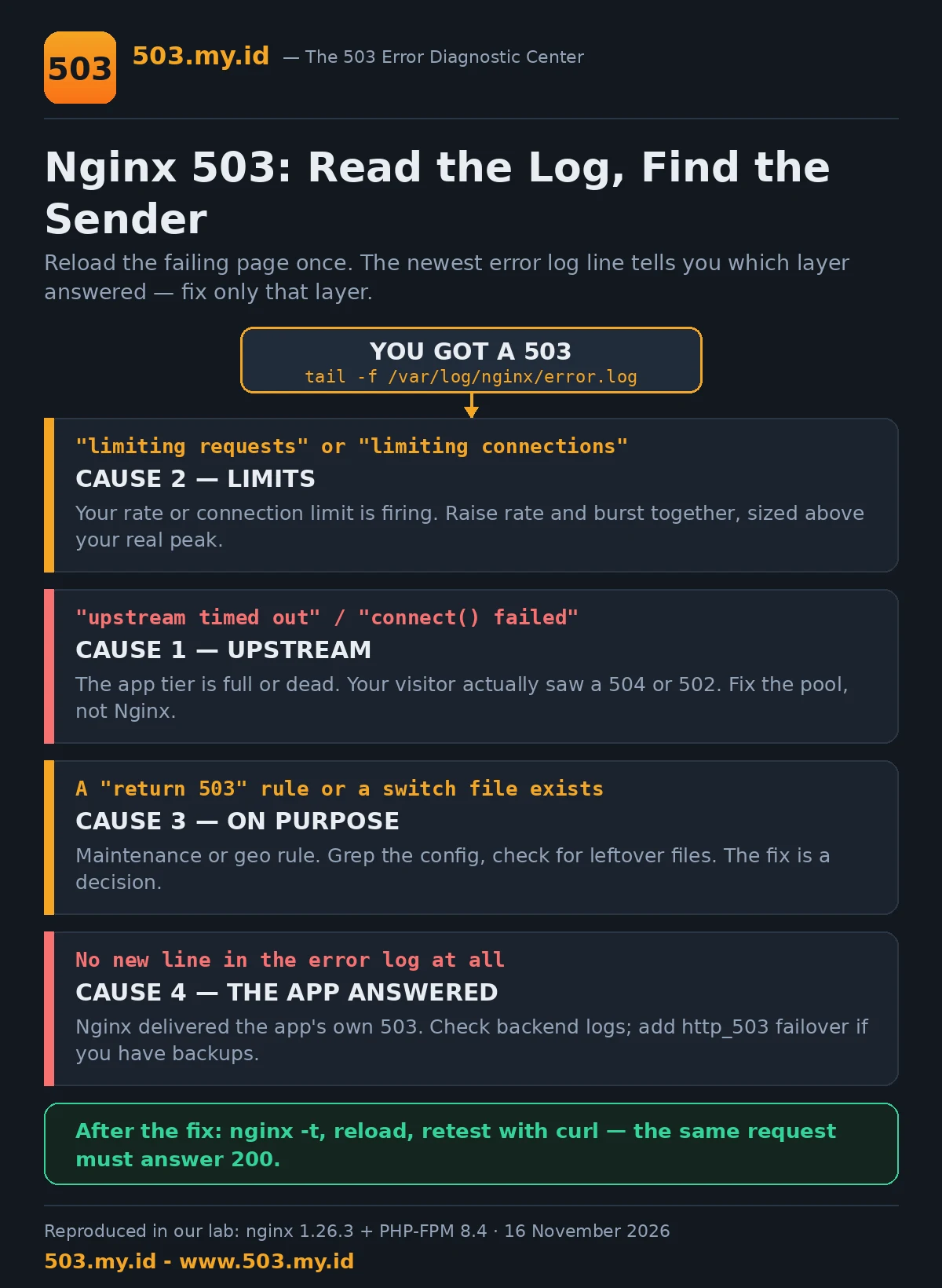
- Tail the error log:
tail -f /var/log/nginx/error.logand reload the page. - Note which line appears: upstream,
limiting requests, or areturn 503rule. - Fix that layer only — then reload Nginx and retest with curl.
The Default Nginx 503 Page
The page our lab captured, word for word:
503 Service Temporarily Unavailable
nginx
That footer is the first clue, not the diagnosis.
It means Nginx generated this response at its own layer.
A limit or a rule inside Nginx decided to answer 503.
But Nginx also delivers 503s it did not create.
When your app answers 503, Nginx passes it through untouched.
The visitor sees the app’s page, not this default one.
So the same status code has three different senders here.
Your error log names the sender. Start there, every time.
New to the code itself? The 503 pillar guide covers the basics.
Read the Error Log First: The 4 Lines That Matter
Reload the failing page once, then read the newest lines.
Four lines cover almost every Nginx 503 you will meet.
| Error log line starts with | Sender | What it means | First fix |
|---|---|---|---|
limiting requests, excess: … by zone "…" |
limit_req | Requests arrived faster than the zone allows. | Raise rate and burst to match real peaks (Cause 2). |
limiting connections by zone "…" |
limit_conn | One IP holds more parallel connections than allowed. | Raise the limit, or exempt shared-IP paths (Cause 2). |
upstream timed out … while reading response header |
Upstream | The app accepted the request but answered too slowly. Your visitor saw a 504, not a 503. | Free or resize the worker pool (Cause 1). |
connect() to unix:… failed |
Upstream | The app process is down or its socket is gone. Your visitor saw a 502. | Start the upstream, then check why it died (Cause 1). |
And the fifth case: no new line at all.
Silence means Nginx saw a normal upstream response.
The upstream itself answered 503, and Nginx delivered it.
That is Cause 4 below, and it fools almost everyone.
Unsure whether your code is 502, 503, or 504?
The HTTP Status Code Explorer separates them side by side.
Cause 1: Upstream (PHP-FPM / App) Is Refusing or Full
Here is the surprise our lab proved twice.
A full PHP-FPM pool does not answer 503 through Nginx.
Requests wait in the pool’s queue instead.
Nginx waits with them, until its read timeout expires.
The visitor then receives a 504, not a 503.
Our run: three workers, twelve parallel twenty-second requests.
Three finished at twenty seconds. Nine died as 504 at thirty.
The FPM log named the real problem in one line:
[16-Nov-2026 15:03:16] WARNING: [pool lab8] server reached pm.max_children setting (3), consider raising itAnd Nginx logged the timeout, request after request:
upstream timed out (110: Connection timed out) while reading response header from upstreamA dead upstream is a different code again.
We stopped PHP-FPM entirely and reloaded the page.
The visitor got a 502, and the log said why:
connect() to unix:/run/php/lab8.sock failed (2: No such file or directory) while connecting to upstreamSo treat “upstream” 503 reports with suspicion.
The fix belongs to the pool, not to Nginx.
Find what holds your workers before raising any limit.
Pool sizing, the RAM math, and slowlog hunting live in the PHP-FPM 503 guide.
Raising fastcgi_read_timeout only hides the queue longer.
It converts 504s into slower 200s until traffic grows again.
Cause 2: limit_req and limit_conn Are Doing Their Job Too Well
Rate limits reject with 503 by default in Nginx.
That default surprises teams expecting a 429.
Our lab zone allowed one request per minute, burst two:
limit_req_zone $binary_remote_addr zone=lab8_burst:10m rate=1r/m;location = /limited.php {
limit_req zone=lab8_burst burst=2 nodelay;
# fastcgi settings omitted
}Ten rapid requests: the first three passed, seven were rejected.
Every rejection wrote the same confession to the error log:
limiting requests, excess: 3.000 by zone "lab8_burst", client: 127.0.0.1, server: lab8.local, request: "GET /limited.php HTTP/1.1"The rest of the site stayed up throughout.
Only the limited location answered 503.
limit_conn behaves the same way, counting connections instead.
With one connection allowed per IP, three parallel requests raced.
One ran for five seconds; two were rejected instantly.
limiting connections by zone "lab8_conn", client: 127.0.0.1, server: lab8.local, request: "GET /slow.php?s=5 HTTP/1.1"The fix is tuning, not removal.
Our tested pair passed all ten requests cleanly:
limit_req_zone $binary_remote_addr zone=lab8_burst:10m rate=20r/s;limit_req zone=lab8_burst burst=20 nodelay;Rate and burst must grow together.
Raising only the rate still rejected half our test burst.
Measure your real peak first, then set both numbers above it.
And remember shared IPs: offices and mobile carriers NAT thousands.
A per-IP limit that fits a bot also fits a building.
Cause 3: A Maintenance or Geo Rule Returning 503 on Purpose
Some 503s are not bugs at all.
A teammate, a past you, or a deploy script added a rule.
The professional pattern is a switch file, tested in our lab:
map $remote_addr $maint_exempt {
    default 0;
    127.0.0.2 1;
}
set $maint 0;
if (-f $document_root/maintenance.on) { set $maint 1; }
if ($maint_exempt) { set $maint 0; }
if ($maint) { return 503; }
error_page 503 @maintenance;
location @maintenance {
add_header Retry-After 3600 always;
default_type text/plain;
return 503 "This site is temporarily unavailable while we run maintenance. Please retry in about an hour.";
}With the file present, visitors received exactly that.
Status 503, a Retry-After: 3600 header, and the custom sentence.
Our exempt test address browsed normally at the same moment.
Deleting the file restored 200s on the very next request.
No reload needed — the check runs per request.
Geo rules use the identical mechanism.
A map on country or address feeds the same return 503.
So before deep debugging, grep your config for return 503.
Then check for switch files your deployment might leave behind.
The fix for this cause is a decision, not a repair.
Either the maintenance is real, or the leftover rule goes.
Cause 4: Upstream Pool Exhausted in a Reverse Proxy Setup
Behind a reverse proxy, the 503 often wears your app’s clothes.
Our lab’s app tier returned its own 503 sentence.
The front Nginx passed it through, word for word.
Its access log recorded 503 — and its error log recorded nothing.
That silence is the signature from the table above.
When the app tier is one of several backends, fail over:
upstream lab8_backend_failover {
    server 127.0.0.1:8092 max_fails=2 fail_timeout=10s;
    server 127.0.0.1:8093 backup;
}
location /failover/ {
proxy_pass http://lab8_backend_failover/;
proxy_next_upstream error timeout http_503;
proxy_connect_timeout 2s;
proxy_read_timeout 5s;
}Without http_503 in proxy_next_upstream, Nginx delivers the 503.
With it, our test client received the backup’s 200 instead.
The primary’s own access log proved it had answered 503 first.
Two lessons hide in that small experiment.
First: log at the backend too, or failovers stay invisible.
Second: max_fails needs real failures before it protects you.
For catching a dying backend before visitors do, see Health Checks That Actually Work.
Our Lab Reproduction
Every claim above was reproduced before it was written.
Stack: nginx 1.26.3 in front of PHP-FPM 8.4, Debian 13.
One slow endpoint — a PHP script sleeping twenty seconds — supplied load.
Test A — limit_req rejects with 503
Zone at one request per minute, burst two, bucket empty.
Ten rapid requests: three times 200, then seven times 503.
Error log: limiting requests, excess: 3.000 by zone "lab8_burst".
Fixed zone (20r/s, burst 20): ten out of ten returned 200.
Test B — limit_conn rejects with 503
One connection per IP; three parallel five-second requests.
One completed at five seconds; two were rejected in a millisecond.
Error log: limiting connections by zone "lab8_conn".
Test C — maintenance switch file
File present: 503, Retry-After: 3600, custom body.
Exempt source address at the same moment: 200.
File removed: 200 on the next request, no reload.
Test D — saturated and dead upstream
Pool cut to three workers; twelve parallel slow requests.
Result: three 200s at twenty seconds, nine 504s at thirty.
FPM log: server reached pm.max_children setting (3).
Nginx log: upstream timed out … while reading response header.
Not one 503 appeared in this test.
Pool restored to ten workers: eight parallel requests, eight 200s.
With FPM stopped instead: a 502, plus a connect() failed line.
Test E — reverse proxy pass-through and failover
Single backend answering its own 503: client received it verbatim.
Front proxy error log gained zero lines during that request.
Failover upstream with proxy_next_upstream http_503: client received 200.
The primary backend’s access log showed its 503 attempt first.
Every configuration shown in this article passed nginx -t in the lab.
What Did Not Work
Our first assumption failed: a full pool would answer 503.
It answers 504 on timeout and 502 when dead.
Anyone debugging by status code alone will misread this layer.
Our first limit test polluted itself twice.
The target file did not exist, so passing requests returned 404.
Then zone memory survived a reload and rejected everything.
A full restart, not a reload, empties a limit zone.
That accident also taught us to distrust restart as a fix.
It “repairs” limit 503s by wiping the evidence.
Finally, raising the rate alone did not fix our burst.
At 20r/s with burst still two, half the burst was rejected.
Burst is the number your peak actually meets.
FAQ
Why does Nginx say 503 instead of 502 here?
Because 502 and 504 are Nginx’s own upstream verdicts.
A 503 means a rule or limit at Nginx, or the app’s own answer.
Where is the Nginx error log on my server?
By default, /var/log/nginx/error.log.
A vhost error_log directive overrides it — our lab used a custom path.
Run nginx -T | grep error_log to see yours.
Does restarting Nginx fix a 503?
Briefly, sometimes: it empties limit zones and stuck queues.
The cause returns with the next burst of traffic.
Our lab watched a restart erase evidence, not the problem.
Can rate limiting cause a 503 for real visitors?
Yes — our lab rejected seven of ten ordinary requests.
Shared IPs and a burst set below your real peak are the usual traps.
Sources and date: Lab reproductions run 16 November 2026 on nginx 1.26.3 and PHP-FPM 8.4.27 (Debian 13).
Directive behaviour follows the official nginx module documentation cited below. Definitions follow RFC 9110.
References
- nginx documentation — ngx_http_limit_req_module (limit_req_zone, limit_req, rejection status).
- nginx documentation — ngx_http_limit_conn_module (limit_conn_zone, limit_conn).
- nginx documentation — ngx_http_upstream_module (max_fails, fail_timeout) and ngx_http_proxy_module (proxy_next_upstream).
- nginx documentation — error_log directive and log levels.
- RFC 9110 §15.6.4 — 503 Service Unavailable (IETF).
- RFC 9110 §10.2.3 — Retry-After (IETF).
Leave a Reply