
Lab-tested: Apache httpd 2.4.71 · MPM event · mod_proxy · Debian 13 · 16 November 2026 · Reproduced and fixed in our lab
On Apache, a 503 usually comes from the proxy layer or an exhausted MPM worker pool.
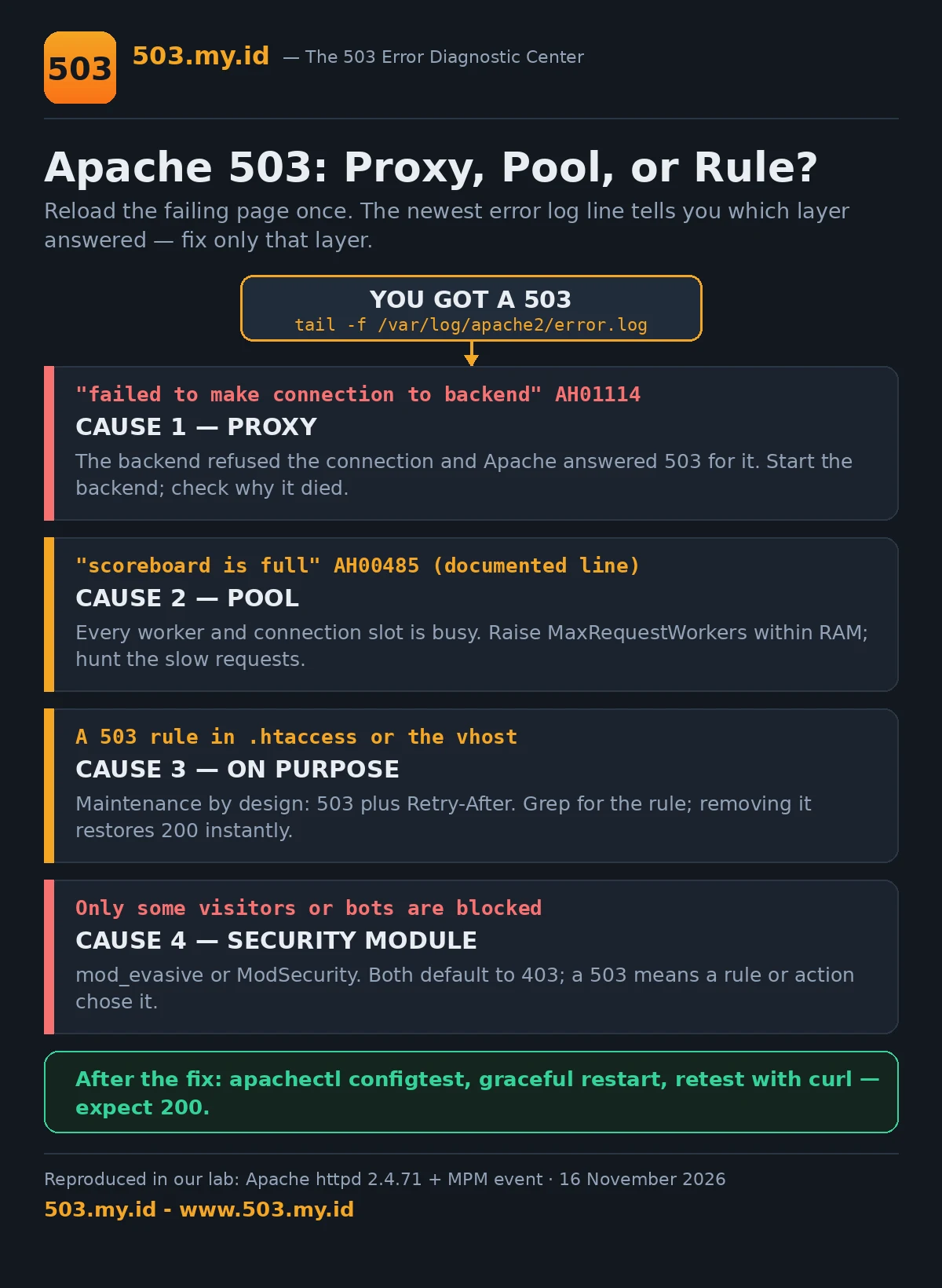
- Open the error log and find the line written at the exact minute of the 503.
- Look for
proxy/AH00898orscoreboard is full— they are different fixes. - Apply the matching fix below, restart gracefully, and retest with curl.
The Default Apache 503 Page
The page our lab captured, word for word:
503 Service Unavailable
The server is temporarily unable to service your request due to maintenance downtime or capacity problems. Please try again later.
That sentence names two families of causes.
Maintenance downtime is Cause 3 — a 503 on purpose.
Capacity problems are Causes 1 and 2.
Apache generated this page itself, at its own layer.
But Apache also relays failures it did not create.
How the backend failed decides 503 versus 502.
Your error log records which one happened. Start there.
New to the code itself? The 503 pillar guide covers the basics.
Migrating from the other web server?
The Nginx 503 guide shows the same failures wearing different log lines.
| Error log line contains | Sender | What it means | First fix |
|---|---|---|---|
AH01114: HTTP: failed to make connection to backend |
mod_proxy | The backend refused the connection — it is down or not listening. Your visitor saw a 503. | Start the backend, then check why it died (Cause 1). |
AH00898: Error reading from remote server |
mod_proxy | The backend accepted, then broke the answer mid-stream. Your visitor saw a 502, not a 503. | Debug the backend crash, not Apache (Cause 1). |
AH00485: scoreboard is full, not at MaxRequestWorkers |
MPM event | Every worker and connection slot is occupied (documented line — our lab’s loads queued instead; see Cause 2). | Raise workers within RAM; hunt slow requests (Cause 2). |
| (no new line; a 503 in the access log only) | A rule, or the app | A maintenance rule fired, or the backend answered its own 503 and Apache delivered it. | Grep for 503 rules (Cause 3); check backend logs. |
Cause 1: mod_proxy / ProxyPass Backend Not Answering
Our lab’s proxy vhost is deliberately ordinary:
ProxyRequests Off
ProxyPass "/" "http://127.0.0.1:8099/"
ProxyPassReverse "/" "http://127.0.0.1:8099/"
With the backend running, requests returned its 200.
We stopped the backend and reloaded the page.
The visitor received Apache’s own 503 page above.
The error log explained it in two lines:
(111)Connection refused: AH00957: http: attempt to connect to 127.0.0.1:8099 (127.0.0.1:8099) failedAH01114: HTTP: failed to make connection to backend: 127.0.0.1Refused connection, 503 verdict. That pairing is the signature.
Then we restarted the backend — same vhost, same curl.
The next request returned 200 in under a second.
No Apache restart was needed for the recovery.
A second failure mode wears a different code.
Our crash backend accepted connections, then dropped them.
The visitor saw a 502 Proxy Error instead.
AH01102: error reading status line from remote server 127.0.0.1:8097AH00898: Error reading from remote server returned by /So “the app is down” is not one diagnosis.
Refused means the app never started or stopped listening.
Dropped means the app started answering, then died.
The fixes live in different log files entirely.
When the backend is PHP-FPM, its pool writes the evidence.
Sizing and slowlog hunting live in the PHP-FPM 503 guide.
Raising Apache timeouts only hides a dead backend longer.
Fix the backend; Apache is just the messenger here.
Cause 2: MPM Worker/Event Scoreboard Full Under Load
Every Apache request needs a worker thread.
Slow requests hold their thread until they finish.
Enough slow requests, and no thread remains for anyone.
Our lab shrank the pool to eight workers:
<IfModule mpm_event_module>
    ServerLimit             1
    ThreadLimit             8
    StartServers            1
    MinSpareThreads         8
    MaxSpareThreads         8
    ThreadsPerChild         8
    MaxRequestWorkers       8
    MaxConnectionsPerChild  0
</IfModule>
That block is a test rig, not a recommendation.
Production values scale the same shape upward.
Our backend answered every request after eight seconds.
A single request: 200, in 8.0 seconds exactly.
Then forty requests arrived at the same moment.
All forty eventually returned 200.
The slowest waited 39.9 seconds for its turn.
Apache queued them in the listen backlog.
It did not reject a single one.
The error log stayed completely empty throughout.
A second test held twenty-four keep-alive connections open.
New probes still answered — slowly, never with 503.
So at lab scale, exhaustion looks like waiting.
On production hosts, the same wall arrives harder.
Backlogs overflow, load balancers time out, visitors give up.
Layers in front convert those hangs into 503s.
And busy real servers do log the documented line:
AH00485: scoreboard is full, not at MaxRequestWorkersIt means workers plus connection slots are all occupied.
Keep-alive connections occupy scoreboard slots too.
The fix is capacity plus shorter requests.
Raise MaxRequestWorkers only inside your RAM budget.
Each busy thread also holds a backend connection.
Then hunt whatever makes requests slow.
One eight-second endpoint consumed our entire pool.
Watch the scoreboard itself with mod_status.
A pool that fills every afternoon is a schedule, not bad luck.
Cause 3: Retry-After Maintenance via .htaccess or vhost Rule
Some 503s are a decision, not a failure.
Planned maintenance should answer 503 with Retry-After.
Search engines treat that pair as “come back later”.
Our tested .htaccess is short:
# maintenance rule — tested in our lab
RewriteEngine On
RewriteCond %{REQUEST_URI} !^/maintenance\.html$
RewriteCond %{REMOTE_ADDR} !^127\.0\.0\.2$
RewriteRule .* - [R=503,L]
Header always set Retry-After "3600"
ErrorDocument 503 /maintenance.html
With it in place, curl captured exactly this:
HTTP/1.1 503 Service Unavailable
Retry-After: 3600
And the body was our custom maintenance page.
Not the default Apache page — ours, word for word.
The exempt address browsed the normal site meanwhile.
That exemption is how you keep working during maintenance.
Deleting the file restored 200s immediately.
No restart, no reload — .htaccess applies per request.
Two lines in that snippet carry the load.
Header always — without always, error responses lose the header.
And the REQUEST_URI condition protects the error page itself.
Skip it, and the rule loops onto its own page.
Our first version made exactly that mistake.
Details are in What Did Not Work below.
The same pattern works in a vhost block.
There it survives .htaccess overrides being disabled.
For the crawler side of this bargain, see Retry-After and Googlebot.
A 200 page saying “down for maintenance” teaches Google nothing.
Worse, it can be indexed as your real content.
Cause 4: mod_evasive / mod_security Returning 503 to Bots — and Humans
Security modules answer abusive traffic before your app.
Their default refusal is usually 403, not 503.
mod_evasive counts requests per IP and per page.
Cross its thresholds and it blocks the address temporarily.
Its default response is a 403 Forbidden.
ModSecurity works from rules instead of counters.
Its default disruptive action denies with status 403.
Individual rules can specify status:503 explicitly.
Hosting panels sometimes ship rules written that way.
So a 503 from this layer is a configuration choice.
Someone, sometime, chose it — or inherited it.
The signature is selectivity: only some visitors fail.
One IP, one user agent, one country, one path.
Everyone else browses the same page fine.
Check the module’s own logs before touching thresholds.
ModSecurity writes an audit log naming the rule.
mod_evasive leaves block files in its hash directory.
We did not reproduce this cause in our lab.
Its behaviour above follows the official module documentation.
It is included because real-world 503 hunts end here.
Loosen thresholds only after confirming who is blocked.
A false positive at checkout costs more than bots do.
Our Lab Reproduction
Every claim above was reproduced before it was written.
Stack: Apache httpd 2.4.71, MPM event, Debian 13.
Three lab backends supplied the failure modes.
One answered instantly, one slept eight seconds, one dropped connections.
Test A — ProxyPass to a stopped backend
Backend up: the proxied request returned its 200.
Backend stopped: Apache answered its default 503 page.
Error log: AH00957 (connection refused), then AH01114.
Backend restarted: 200 again, no Apache restart needed.
Test A2 — backend accepts, then drops
The crash backend closed every accepted connection.
The visitor received a 502 Proxy Error.
Error log: AH01102, then AH00898.
Same vhost shape, opposite verdict from Test A.
Test B — eight workers against a slow backend
Pool cut to MaxRequestWorkers 8; backend slept eight seconds.
Single request: 200 in 8.0 seconds.
Forty parallel requests: forty 200s, slowest 39.9 seconds.
Error log during the whole run: empty.
Keep-alive flood afterwards: probes still answered 200.
Apache absorbed the overload by queueing, not rejecting.
Test C — maintenance .htaccess
Rule v2 in place: 503, Retry-After: 3600, custom body.
Exempt source address at the same moment: 200.
Rule removed: 200 on the very next request.
Every configuration shown passed apachectl configtest.
What Did Not Work
Our first maintenance rule sabotaged its own error page.
The rewrite matched /maintenance.html too.
Apache served its default page plus an embarrassing note:
“Additionally, a 503 error was encountered while using an ErrorDocument.”
One RewriteCond excluding the page fixed it.
Our second assumption failed: a full pool answers 503.
At lab scale it answers nothing — requests simply wait.
Forty parallel slow requests all completed.
Anyone debugging by status code alone misses this failure.
The site is “up”, and every visitor waits forty seconds.
We also hunted the scoreboard line twice.
Parallel load and a keep-alive flood both failed.
AH00485 never appeared on this stack at this scale.
We report the line from documentation, labelled as such.
Finally, “restart Apache” fixed nothing in any test.
The backend tests recovered without touching Apache at all.
Restarting would only have hidden the evidence.
FAQ
Why does Apache return 503 when my app is down, not 502?
It depends on how the app fails.
Refused connection: Apache answers 503 (AH01114).
Accepted then dropped: Apache answers 502 (AH00898).
Our lab produced both, one minute apart.
What does “scoreboard is full” mean?
The scoreboard tracks every worker and connection slot.
Full means no slot can take a new request.
Slow requests and idle keep-alives occupy slots alike.
How do I return 503 with Retry-After on purpose?
Use the tested .htaccess in Cause 3.
Rewrite to 503, set the header with always.
Exempt your own address and the error page itself.
Does mod_security cause 503?
Only when a rule or action says so.
Its default denial is 403, like mod_evasive.
A 503 from either means a deliberate configuration.
Sources and date: Lab reproductions run 16 November 2026 on Apache httpd 2.4.71 with MPM event (Debian 13).
Module behaviour follows the official Apache httpd 2.4 documentation cited below. Definitions follow RFC 9110.
References
- Apache httpd Documentation 2.4 — mod_proxy and mod_proxy_http (ProxyPass, AH01114, AH00898).
- Apache httpd Documentation 2.4 — event MPM (MaxRequestWorkers, scoreboard, AH00485).
- Apache httpd Documentation 2.4 — mod_rewrite and mod_headers (R=503, Header always).
- Apache httpd Documentation 2.4 — Error Log and ErrorDocument.
- ModSecurity and mod_evasive documentation (disruptive actions, default denial status, rule status option).
- RFC 9110 §15.6.4 — 503 Service Unavailable (IETF).
- RFC 9110 §10.2.3 — Retry-After (IETF).
Leave a Reply