
Lab record, 18 November 2026: our account held two PHP workers and a two-connection ceiling. Six parallel requests split cleanly: two finished, four refused 503.
503s that appear only at busy moments usually mean a quota, not a crash.
- Find the rejection line in the web server error log; it names the saturated limit.
- Count busy PHP workers at that same minute before raising anything.
- Raise the binding limit one step, retest under the same load, keep the log.
Not sure the 503 is yours at all? Start with the 503 Decision Tree.
Resource-limit 503s have a rhythm: quiet hours behave, busy minutes fall over.
That rhythm is diagnostic gold, because crashes rarely keep office hours.
Something in the account fills up, refuses new work, then drains and looks innocent.
Which Limit Actually Ran Out?
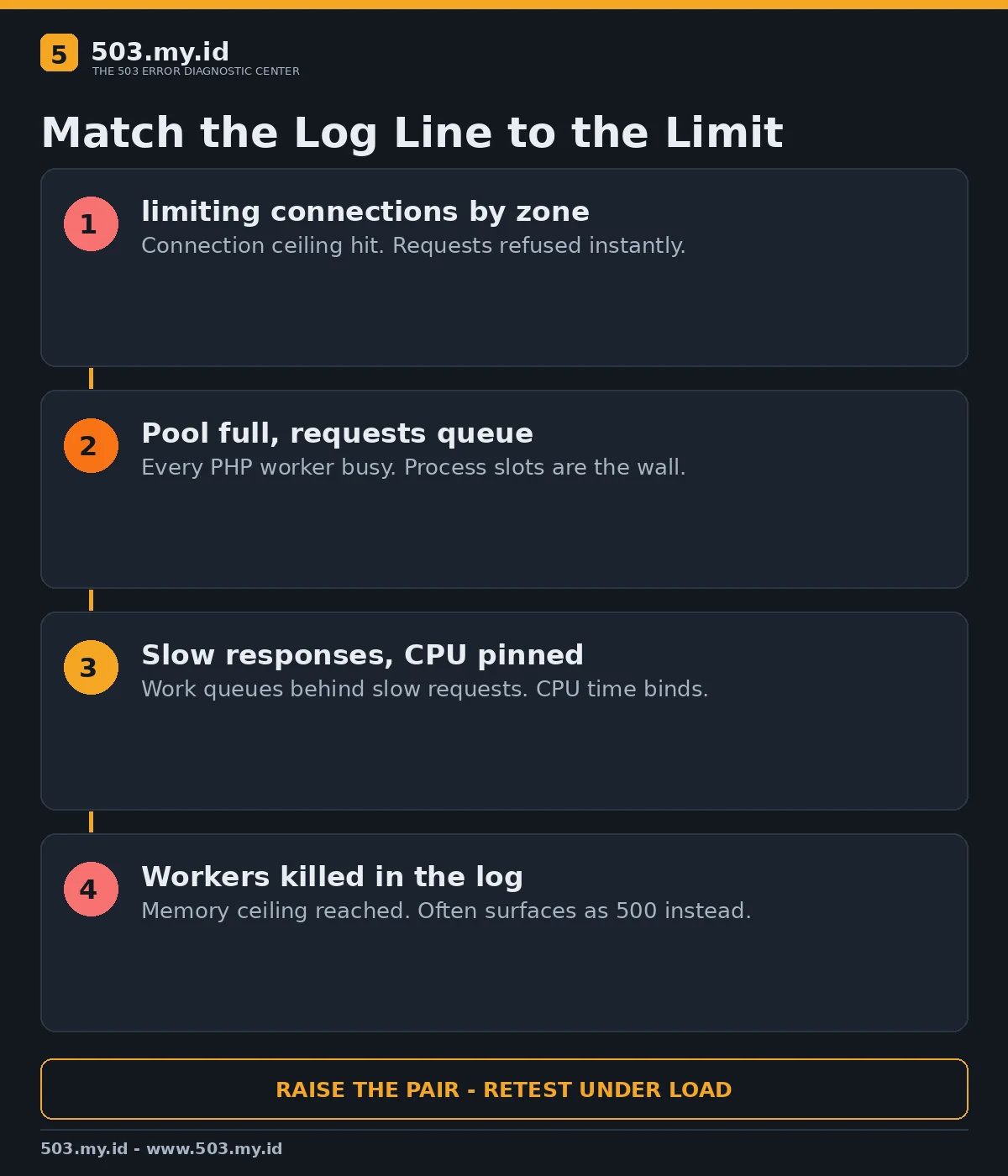
Four quotas commonly hide behind the same 503 page:
- Process slots — every PHP worker is busy; new requests have nowhere to run.
- Concurrent connections — the front server caps simultaneous requests per account or address.
- CPU time — work runs so slowly that queues form behind it.
- Memory — workers get killed, which often surfaces as 500 or a dead upstream instead.
Guessing between them wastes money. The error log already voted; read its line first.
Our decision chart maps each log signature to the limit it belongs to:
Our Lab: Two Workers, Six Requests
The lab stack was nginx 1.26.3 in front of PHP-FPM 8.4.27, pool fixed at two workers.
A test endpoint burned CPU for about 2,2 seconds on every request.
Six parallel requests arrived together. Two workers took the first pair:
{"ok":true,"pid":360949,"finished":"2026-11-17T23:43:33+00:00"}
{"ok":true,"pid":360948,"finished":"2026-11-17T23:43:33+00:00"}
The other four never reached PHP. The nginx error log says why, verbatim:
limiting connections by zone "batchb_account", client: 127.0.0.1,
request: "GET /work.php HTTP/1.1"
Each refused request returned 503 in under 25 milliseconds — rejection, not slowness.
The binding configuration pair was deliberately small:
limit_conn_zone $binary_remote_addr zone=batchb_account:10m;
# inside the location:
limit_conn batchb_account 2;
[resource]
pm = static
pm.max_children = 2CPU load rose during the test, but CPU was not the binding constraint.
Slots were. The two accepted requests prove the application itself was healthy.
The Fix We Tested
We raised both ceilings together, from two to six, and changed nothing else.
The pool definition became pm.max_children = 6; the connection limit became six.
The identical six-request burst then finished six for six, each in about 2,2 seconds.
Raising only one ceiling would have moved the refusal to the other layer.
That is the tested pattern for real accounts: identify the pair, raise both, retest.
On shared hosting, the same move is a plan upgrade or a host ticket — bring the log line.
My choice for a growing site: buy headroom for the binding limit, not the biggest bundle.
Pool sizing maths lives in the PHP-FPM pool guide.
Reading cPanel-Style Resource Graphs Honestly
A graph pinned at its ceiling during the 503 window supports the quota theory.
A graph near zero while 503s fly points elsewhere — code, upstreams, or a proxy.
Entry processes near their cap match our lab’s slot saturation most closely.
CPU near its cap with slow responses matches queueing, not instant rejection.
Match the graph’s timestamp to the log line before believing either one.
The cPanel walkthrough of the same hunt is in our cPanel 503 guide.
What Did Not Work
Restarting PHP-FPM changed nothing; the pool refilled to the same ceiling within seconds.
Raising the connection limit alone was pointless while two workers remained the real wall.
Watching CPU alone misled the first reading — load rose, yet slots caused the refusals.
A single polite request always succeeded, which hid the limit completely.
Only parallel load exposed it. Test the way your visitors actually arrive.
Prevention
Alert on worker occupancy and rejected connections, not merely on downtime.
Load-test before campaigns; the ceiling you find on Tuesday is cheaper than Saturday’s.
The full routine sits inside how to prevent 503 errors.
Spot-check the public view any time with our free 503 checker.
FAQ
How do I know a 503 came from resource limits?
The rejection is instant, load-shaped, and named in the error log — slots, connections, or CPU.
Is a 508 the same problem?
Related, not identical. CloudLinux often answers 508 when account limits trip; the hunt is similar.
Should I just upgrade my hosting plan?
Only after the log names the binding limit. Upgrading the wrong quota changes nothing.
Why does the site work again minutes later?
Workers finish and slots drain. The limit did not heal; the queue emptied.
Sources and date: NGINX and PHP-FPM official documentation and our lab reproduction, checked 18 November 2026.
References
- NGINX Documentation — Module ngx_http_limit_conn_module
- PHP Manual — FPM Configuration (pm.max_children)
- RFC 9110 §15.6.4 — 503 Service Unavailable
- MDN Web Docs — 503 Service Unavailable
Leave a Reply