
Lab record, 18 November 2026: one PHP script killed its LiteSpeed worker six straight times. OpenLiteSpeed 1.9.4, PHP 8.2.35: 503 every time, then clean recovery.
Static files still load, PHP pages return 503? Suspect the PHP worker, not the web server.
- Open the LiteSpeed error log and look for
oops! 503 Service Unavailable. - Read the
[STDERR]lines directly above it; they name the failing script. - Fix that script first, then restart PHP only — not the whole server.
Still unsure which layer answered? Walk the 503 Decision Tree before changing settings.
A LiteSpeed 503 feels backwards the first time you meet one.
The server is clearly alive — it just answered you — yet your PHP application never ran.
That split is the clue. LiteSpeed received the request, handed it to a PHP worker, and got silence back.
The Symptom Split: Static Works, PHP Fails
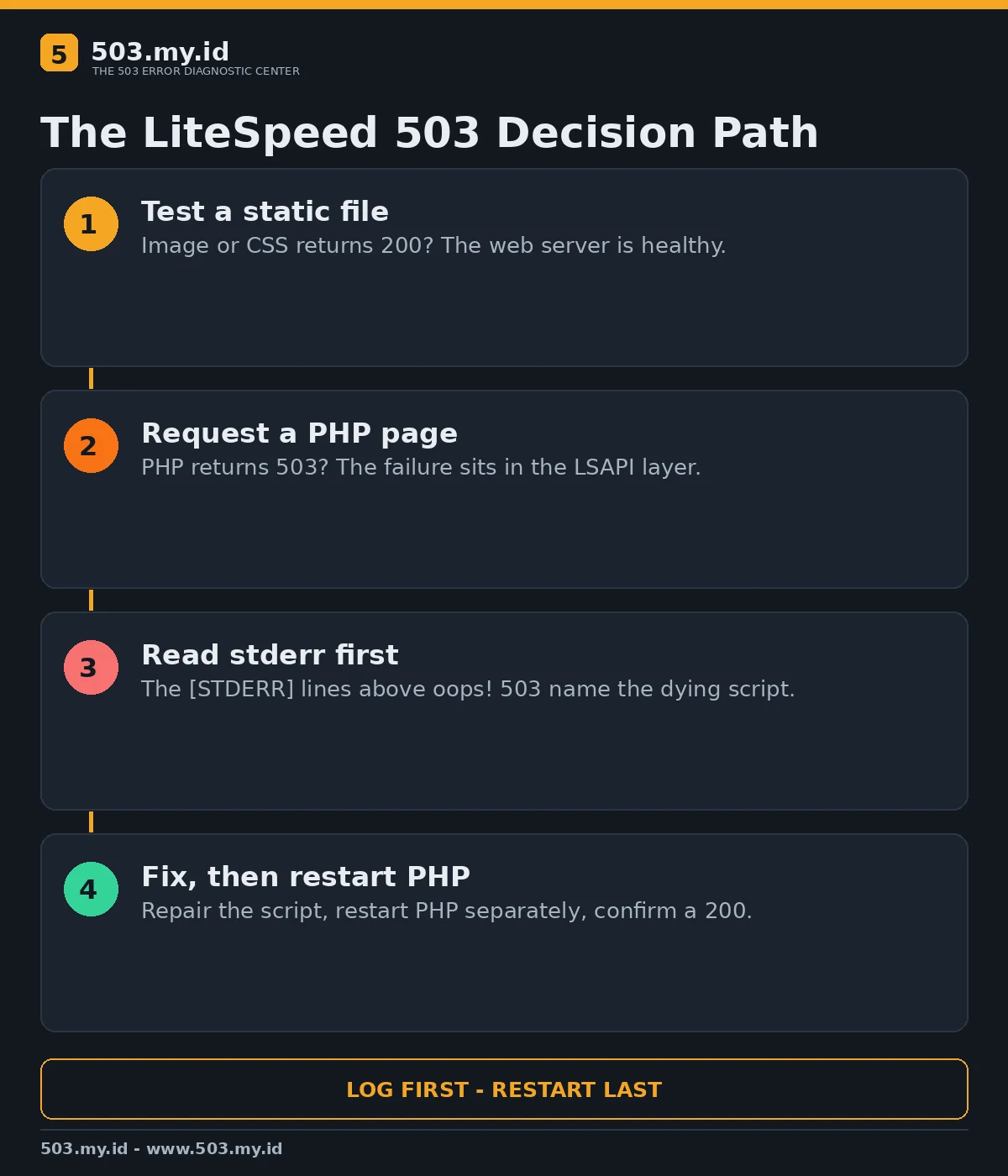
Test one image or CSS file on the same domain, then one PHP page.
When the file returns 200 and the page returns 503, the web server itself is healthy.
The failure sits in the LSAPI layer: the detached PHP processes LiteSpeed talks to.
Our flowchart compresses that first fork in the road:
Read the Log Before Restarting Anything
A restart clears the symptom and destroys your evidence in the same click.
Open /usr/local/lsws/logs/error.log first, plus stderr.log on native installs.
On cPanel servers the server error log usually lives at /usr/local/apache/logs/error_log.
Search backwards from the newest oops! 503 line.
The [STDERR] entries above it carry the PHP error, the script path, and the timestamp.
LiteSpeed’s own documentation makes the same point: most 503s are PHP malfunctions, not LiteSpeed failures.
Our Lab: A PHP Worker That Kept Dying
We ran OpenLiteSpeed 1.9.4 with its bundled PHP 8.2.35 in an isolated container.
One test script terminated its own PHP process with a fatal signal on every request.
Six consecutive requests produced six identical answers:
HTTP/1.1 503 Service Temporarily Unavailable
Server: LiteSpeed
The error log showed the sequence LiteSpeed support articles describe — retries, then surrender:
[STDERR] BATCHB_LSPHP_SIGSEGV_MARKER
oops! 503 Service Unavailable
Static content and a healthy PHP page kept returning 200 throughout the crash loop.
That contrast is the reproduction: the server never died; one worker path did.
The PHP external application in the tested configuration runs over a Unix socket:
extProcessor lsphp {
    type                            lsapi
    address                         uds://tmp/lshttpd/lsphp.sock
    path                            fcgi-bin/lsphp
}
The Fix, Step by Step
First, remove or repair the code that is killing the worker.
In the lab, replacing the crashing script with a healthy one ended the failure immediately.
Second, restart PHP separately so stale detached workers are replaced.
LiteSpeed 5.3 and later keep PHP detached, so a server restart alone may not do it.
sudo touch /usr/local/lsws/admin/tmp/.lsphp_restart.txtOn a single account, touching .lsphp_restart.txt in that account’s home directory is narrower.
Third, request the same URL again and confirm a 200 in the browser and the log.
Our repaired script answered 200 on the first request after the targeted PHP restart.
Fourth, keep watching the log for thirty minutes; a crash loop usually returns fast.
Other LiteSpeed 503 Causes Worth Checking
A fatal PHP error returns 500 in our first lab attempt, not 503 — check stderr either way.
Opcode cache faults are a documented suspect; disable the cache briefly and retest.
Legacy extensions such as Suhosin or Zend Guard can break a PHP build after upgrades.
On CloudLinux, process and memory limits can surface as 503 when PHP cannot start.
Disk exhaustion belongs on the list too, because PHP cannot write sessions or temporary files.
My order is deliberate: log, script, PHP restart, limits, extensions, cache.
Changing memory limits before reading stderr is how this error survives three restarts.
For the pool-side view of the same failure shape, read the PHP-FPM pool guide.
What Did Not Work
Restarting LiteSpeed without touching PHP changed nothing in early test runs.
The detached workers kept their state, exactly as LiteSpeed’s documentation warns.
A plain PHP fatal error also failed as a reproduction: it produced a 500.
Only a worker that actually died mid-request produced the documented 503 pattern.
Guessing at memory_limit was useless; the log named the dying process in seconds.
Prevention
Alert on the error log, not just on uptime; the oops! 503 line arrives first.
Stage PHP version and extension changes, then watch stderr during the first hour.
Fold these checks into the wider routine in how to prevent 503 errors.
When a 503 appears anyway, confirm the outside view with our free 503 checker.
FAQ
Does a LiteSpeed 503 mean the web server crashed?
Usually not. LiteSpeed answered the request; the PHP worker behind it failed or stalled.
Where is the LiteSpeed 503 log?
Start with /usr/local/lsws/logs/error.log; cPanel servers often use /usr/local/apache/logs/error_log.
Will restarting LiteSpeed fix a PHP crash loop?
Not reliably. PHP runs detached, so restart PHP separately after fixing the script.
Why did my PHP fatal error show 500 instead?
A handled fatal error still gets a response out. A worker dying mid-request becomes 503.
Sources and date: LiteSpeed official documentation and our lab reproduction, checked 18 November 2026.
References
- LiteSpeed Documentation — 503 Error (cPanel)
- LiteSpeed Documentation — PHP with cPanel and LiteSpeed Web Server — Restart PHP
- LiteSpeed Documentation — CloudLinux Issues
- RFC 9110 §15.6.4 — 503 Service Unavailable
- MDN Web Docs — 503 Service Unavailable
Leave a Reply